.png)
Deepfake interview detection: a practical guide for in-house hiring teams

March 15, 2026
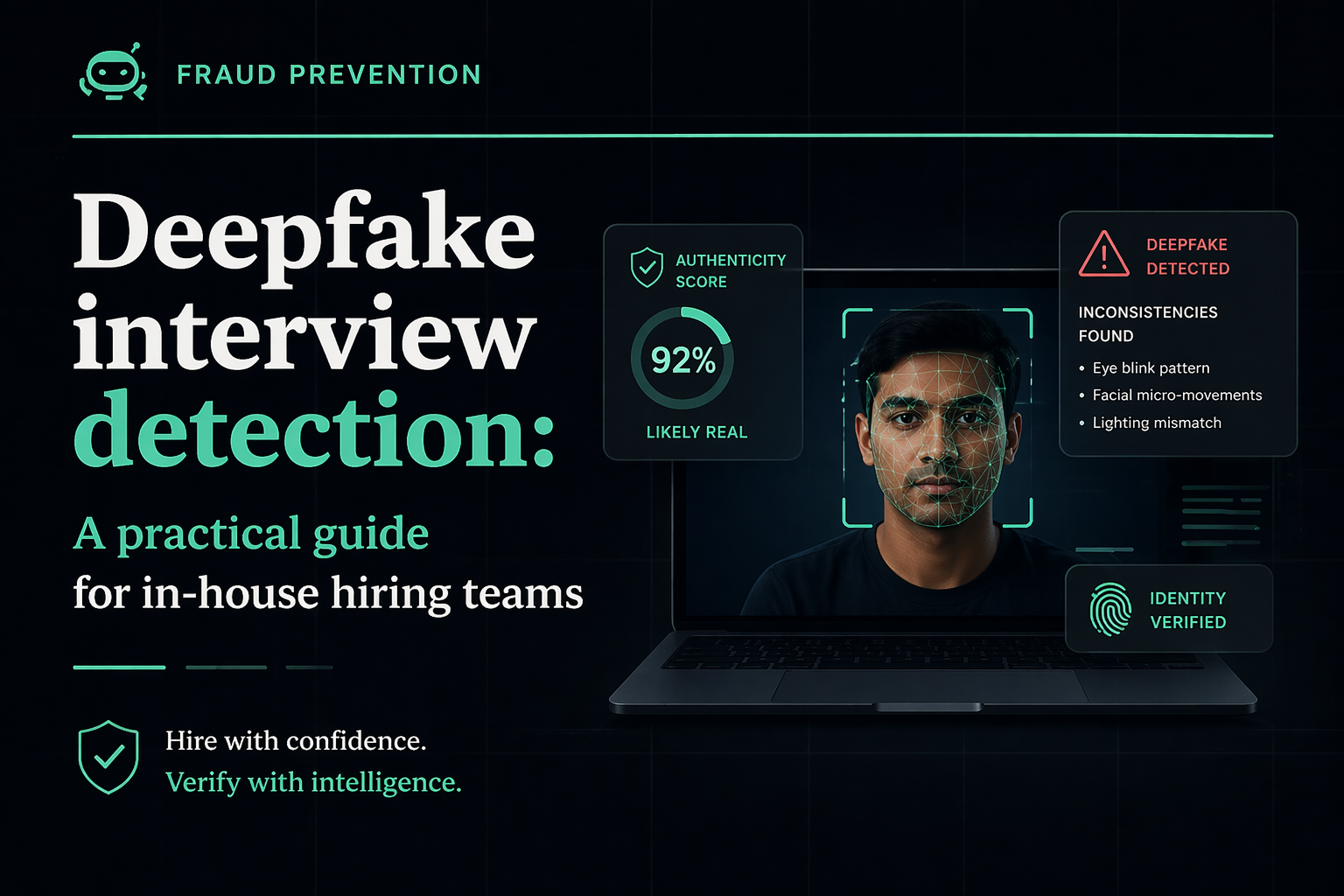
A no-fluff, step-by-step playbook for spotting fake candidates in video interviews — complete with technical red flags, behavioral cues, and a detection protocol you can roll out this week.
What Is Deepfake Interview Fraud?
Deepfake interview fraud is when a candidate uses AI-generated video or audio — often powered by face-swapping or voice-cloning technology — to impersonate someone else, or to alter their own appearance, voice, or identity during a live or recorded video interview. The goal is typically to pass background checks, fake credentials, or gain unauthorized access to a sensitive role.
It sounds like something out of a thriller. But hiring managers at real companies — from SaaS startups to Fortune 500 firms — are reporting it more and more. A candidate shows up on a Zoom call looking slightly "off." Their lips don't quite match what they're saying. Their skin looks smooth in a strange, airbrushed way. Their background flickers at the edges.
That might not be bad internet. It might be a deepfake.
Unlike the obvious scam CVs of five years ago, today's AI interview fraud is sophisticated enough to fool recruiters who aren't looking for it. The technology has gotten cheaper, more accessible, and frankly, better. Understanding what you're dealing with is the first step to protecting your organization.
Why Deepfake Hiring Fraud Is Rising in 2026
There's no single reason this problem has exploded. It's more like a perfect storm — several forces converging at once to make deepfake hiring fraud not just possible, but surprisingly common.
1. Remote hiring became the norm — and the process never caught up
When companies shifted to remote-first hiring during and after the pandemic, most adapted quickly on the scheduling side. The verification side? That lagged way behind. Many companies still rely entirely on a video call and some emailed documents to make hiring decisions. There's no in-person element, no physical ID check, no "gut check" from being in a room with someone. That gap is exactly what fraudsters exploit.
2. The tools are cheap, accessible, and getting better fast
Two years ago, a convincing real-time face swap required serious technical skill. Today, consumer-grade apps can do it in real time with a reasonable webcam and a $10/month subscription. Voice cloning tools can replicate someone's speech from just a few minutes of audio. The barrier to entry for deepfake hiring fraud has essentially collapsed.
3. High-paying remote roles are worth the effort
When there's a $150,000 remote engineering role on the line, the ROI of a deepfake attempt looks different. North Korean IT operatives — yes, genuinely — were documented by the FBI in 2023 and 2024 using fake identities to apply for remote tech jobs at US companies. This isn't theoretical risk. It's documented, active, and financially motivated.
4. AI-generated synthetic identities are harder to catch than stolen ones
Older fraud involved using a real person's stolen identity. Background checks could sometimes catch discrepancies. Synthetic identity fraud — where the candidate's entire persona is fabricated using AI (photo, name, credentials, employment history) — is far harder to detect. There's no "real" person to cross-reference. Conventional hiring workflows weren't built to handle this.
Which Roles Are Most at Risk?
Not all open positions attract the same level of fraud risk. Deepfake hiring fraud is highly opportunistic — it concentrates around roles that are high-value, fully remote, and hard to verify in real time.
Software Engineers and Developers
Tech roles dominate the fraud landscape. They're remote by default, pay well, and the skills are theoretically verifiable through tests — but coding assessments can be outsourced too. A candidate could use a deepfake to interview live while someone else does the technical screening on their behalf.
Fintech, Crypto, and Financial Services Roles
Roles with access to financial systems, customer data, or high-value infrastructure are particularly targeted. The potential payoff — whether via data theft, financial fraud, or corporate espionage — makes the extra effort worthwhile for sophisticated actors. If you're hiring anyone with access to payment systems or banking infrastructure, your verification bar needs to be significantly higher.
Senior Leadership and Executive Hires
Less common but increasingly reported: deepfake fraud targeting executive-level interviews. The logic is simple — a senior hire gets more access, more trust, and less day-to-day supervision. It's a high-value target. And many executive hiring processes are surprisingly informal once a strong resume comes through.
Any Fully Remote, Globally Distributed Role
The broader the geographic net you cast, the harder it gets to verify identity. Roles that welcome international applicants and require no in-person element are structurally more exposed. This isn't a reason not to hire globally — it's a reason to build smarter verification into the process.
The combination of "fully remote + high salary + fast onboarding" is a magnet for fraud attempts. If a candidate is pushing to start immediately with minimal documentation, treat that as a yellow flag — not a red one on its own, but worth slowing down.
5 Technical Signs of a Deepfake Interview
Here's where things get practical. Most deepfake detection in hiring doesn't require special software — it requires knowing what to look and listen for. Train yourself and your team on these five technical indicators.
Sign #1: Lip Sync Lag
Sign #2: Abnormal Blinking Patterns
Sign #3: Background Artifacts
Sign #4: Audio-Video Mismatch
Sign #5: Lighting Inconsistency
Quick Detection Checklist
- Lip movement syncs naturally with audio throughout the call
- Natural, irregular blinking observed (approx. 15–20x per minute)
- No pixelation, warping, or flickering around hair/ears/shoulders
- Voice quality matches the apparent room environment
- Lighting on face changes naturally when they move
- Face texture looks natural (not overly smooth or "plastic")
- Eye reflections are consistent and natural
- No freeze-frame effect during rapid head movements
5 Behavioral Signs of a Fake Candidate
Technical glitches aren't the only giveaway. Sometimes the biggest red flags are in how a candidate behaves — not how they look on camera.
1. Delays Before Answering — Even Simple Questions
Ask a legitimate candidate "Where did you grow up?" and you get an instant, natural response. A deepfake operation often involves a relay: the fraudster hears the question, relays it to someone else (or prompts an AI), and reads back the answer. Watch for a consistent delay pattern — especially on personal questions where there should be zero lag.
2. Scripted, Over-Polished Answers That Miss the Emotional Register
Legitimate candidates pause, self-correct, tell stories with messy real-life details. A coached or AI-assisted candidate often sounds polished to the point of being uncanny. If every answer sounds like a LinkedIn post, push with a follow-up: "Can you tell me about a time that actually went wrong?" and see how they respond under gentle pressure.
3. Refusal or Hesitation Around Spontaneous Tasks
Ask them to write their name on a physical piece of paper and hold it up to the camera. Or share their screen to open their LinkedIn profile. Legitimate candidates cooperate easily. Candidates running a deepfake setup often freeze, make excuses ("my phone camera is broken"), or stall. These simple, unexpected requests can break the illusion very quickly.
4. Identity Documents That Feel "Too Clean"
AI-generated IDs and headshots have gotten remarkably good — but they're often too perfect. Real IDs have wear, slight misalignment, photos that were taken in different lighting. Synthetic identity documents tend to look like they were designed, not lived in.
5. Inconsistency Between the Resume, the Interview, and the Person
Ask for a specific story from their resume — "Tell me about the project at [Company X] where you reduced churn by 30%." If their story is vague, generic, or doesn't hold up to basic follow-up questions ("Who was your manager there? What was the biggest technical challenge?"), it's either fabricated or coached. Press gently and consistently.
A US cybersecurity firm hired a remote developer who spent months on their team before IT flagged anomalous behavior. Investigation revealed the "employee" was a North Korean operative who had used a fabricated identity and deepfake video during the interview process. The cost — in compromised systems and legal remediation — ran into six figures. This is not a hypothetical.
Live Interview Tests to Catch Deepfakes
You don't need to make the interview feel like an interrogation. These tests can be woven naturally into any conversation — they're simple, low-friction for legitimate candidates, and very effective at exposing fraud.
Test 1: The Paper Name Test
At any point during the call, casually ask the candidate to write their full name on a piece of paper and hold it up to the camera. This takes five seconds. It confirms that a real person matching the camera feed is actually present. A deepfake overlay can't retroactively add a handwritten sign to a pre-recorded or filtered video.
Test 2: The Head Turn Request
Ask them to turn their head slowly to the left, then to the right, as if they're checking behind them. For a deepfake, head rotation increases the load on the face-swap model significantly — edge artifacts, texture inconsistencies, and brief "ghost" effects often appear during this movement.
Test 3: The Spontaneous Reaction Test
Say something unexpected and mildly amusing mid-interview — a light joke, a slightly surprising statement. Watch for authentic spontaneous reaction: a natural smile, a slight raise of the eyebrow, a real laugh. These micro-expressions are very hard for AI to generate in real time.
Test 4: The Audio-Only Switch
Partway through, ask if they mind switching to audio-only for a few minutes — "my connection's a bit choppy" works as a pretext. Some face-swap setups use different audio processing, and removing the visual layer sometimes exposes inconsistencies in how the voice sounds.
Test 5: The Unplanned Screen Share
Ask them, mid-conversation, to quickly share their screen to show you their portfolio, GitHub, or LinkedIn profile. It also forces them to interact with their actual machine in real time — something that breaks certain deepfake setups that run through virtual cameras or overlay tools.
Test 6: The Follow-Up Reference Trap
Mention a specific person's name — ideally someone who could plausibly have worked at the candidate's claimed previous employer — and ask if they ever worked with them. What you're testing is whether the candidate's response is specific and natural vs. vague, evasive, or suspiciously agreeable.
Deepfake Detection Protocol for Hiring Teams
Random vigilance isn't a strategy. The most effective approach is a consistent, repeatable protocol that your entire hiring team applies.
Pre-Screen: Flag High-Risk Applications Early
Before any interview, flag roles above a salary threshold (e.g., $90K+) or fully remote positions for enhanced verification. Cross-reference the submitted headshot against their LinkedIn profile photo using reverse image search. Check if the resume email domain is free/generic (Gmail, Yahoo) for a senior-level role — this is a low-signal but quick filter.
Live Verification: Run In-Call Tests Consistently
During every video interview for flagged roles, run at minimum the paper name test and the head turn test. Log what you observe — don't rely on memory. Use a simple scoring sheet: "lip sync: normal/delayed," "blinking: natural/abnormal," "background: stable/flickering."
Final Validation: Document + Cross-Reference Identity
Before any offer, require a live video ID verification — not just an emailed scan. Request two forms of ID where possible. Cross-reference the face with the submitted ID in real time, on camera. For senior roles, consider a brief phone call with a listed reference before extending an offer.
Escalation: What to Do When Something Feels Wrong
Define your escalation path before you need it. If an interviewer flags concerns, they should have a clear person to escalate to, a documented set of observations, and a hold on the process — no offers extended while the case is reviewed. Speed kills here: the pressure to fill roles quickly is exactly what fraudsters count on.
Run a 30-minute internal workshop using publicly available deepfake video examples (YouTube has dozens). Have your team practice spotting the tell-tale signs before they encounter them in a live interview. Pattern recognition gets much better with deliberate practice.
Tools for Deepfake Interview Detection
The tooling landscape here is evolving fast. A category that barely existed three years ago now has multiple commercial players offering everything from real-time video analysis to voice biometric verification.
Analyze video streams during live calls for artifacts, facial inconsistencies, and deepfake patterns. Some integrate directly with Zoom or Teams. Best for high-volume hiring pipelines.
Create a voiceprint during a screening call, then match it at later stages. Useful for detecting voice-cloning or candidate impersonation across multiple rounds.
Live liveness-check ID verification (e.g., Persona, Jumio, Onfido). The candidate holds up their ID in real time and performs a facial match. Much harder to spoof than a document email.
Run submitted headshots through Google Reverse Image, FaceCheck.ID, or similar tools to check if the image appears on other profiles or is AI-generated.
For written assessments and application materials, tools like GPTZero or Copyleaks can flag suspiciously AI-generated cover letters or skills assessments.
Some background screening providers now offer synthetic identity detection — cross-referencing data points that wouldn't exist for a fabricated persona.
The Honest Limitations of These Tools
It would be dishonest to present AI detection tools as foolproof. They're not. A few things to keep in mind:
- False positives happen. Poor lighting, a laggy internet connection, or an unusual webcam can trigger alerts for legitimate candidates. Never auto-reject based on a single tool flag.
- False negatives also happen. Sophisticated deepfakes can fool many current detection models. Tools are a layer in your security strategy, not the whole strategy.
- Consent and compliance matter. Using biometric analysis tools on candidates may require explicit consent and compliance with applicable privacy laws (GDPR, BIPA, etc.). Get legal sign-off before deploying any biometric tooling.
No single tool eliminates deepfake risk. The most resilient hiring teams combine technology with trained human judgment and consistent process. Tools amplify good protocol — they don't replace it.
What To Do If You Detect a Fake Candidate
Finding what appears to be a deepfake interview is disorienting. Here's a clear-headed sequence to follow — balancing speed with due diligence.
Step 1: Pause, Don't React
Don't confront the candidate mid-call. Don't send an immediate rejection email. Finish the interview normally (or find a natural stopping point) and document everything you observed while it's fresh. Your instinct to act immediately can compromise your ability to investigate properly.
Step 2: Document the Evidence
Write up what you saw and when — timestamps are valuable. If your platform records calls and you have candidate consent, preserve the recording. Note the specific technical anomalies: lip sync issues, background artifacts, audio inconsistencies. Keep the original application materials, resume, and any submitted documents.
Step 3: Loop in Your Security or Legal Team
Depending on the role, suspected deepfake fraud may have legal implications — particularly if the candidate provided falsified documentation or the role involves regulated industries. Your legal or security team needs to know before any further communication with the candidate.
Step 4: Send a Verification Challenge
Rather than ghosting or rejecting immediately, you can send a structured verification request — a live video ID check, a specific in-person meeting request, or a request for additional documentation. A genuine candidate will comply easily. A fraudulent one will typically withdraw or go silent.
Step 5: Report Where Appropriate
For serious cases — especially those involving synthetic identities or potential links to organized fraud — consider reporting to relevant authorities. In the US, the Internet Crime Complaint Center (IC3) accepts reports of hiring-related identity fraud.
Step 6: Update Your Process
Every detected case is free intelligence. After the incident, review what almost made it through. Was it a gap in your pre-screen? A step that was skipped because the candidate seemed strong? Use it to tighten the protocol — not to add bureaucracy, but to close the specific gap that was exploited.
Frequently Asked Questions
The most common technical signs include lip sync lag (audio and mouth movements slightly out of sync), abnormal blinking patterns, flickering or warped pixels around the hair and face edges, audio that doesn't match the visual environment, and lighting on the face that doesn't change naturally with movement. Behavioral signs include scripted answers, delays on personal questions, and resistance to spontaneous tasks like writing their name on camera.
The most effective approach combines trained human observation during video interviews with simple live tests (paper name test, head turn request, unplanned screen share). Pair this with pre-screening steps like reverse image search on headshots and live video ID verification before extending offers. For high-risk roles, add biometric or AI-powered video analysis tools as an additional layer — but treat them as one input, not the final word.
Yes — AI tools can assist fraudsters in passing interviews in several ways. Real-time face-swap tools can replace one face with another during a live video call. Voice cloning can mimic a different person's speech. AI co-pilots can feed scripted answers in real time via an earpiece or second screen. Interview workflows that rely solely on video and a resume without live verification steps are genuinely vulnerable to these approaches.
Synthetic identity fraud in hiring is when a candidate's entire persona is artificially constructed — combining fake or AI-generated photos, fabricated credentials, invented employment history, and sometimes a fraudulent government ID. Unlike identity theft (which involves stealing a real person's identity), synthetic identity fraud creates a new, fictional person. It's harder to detect because there's no "real" individual to cross-reference against public records.
They're more common than most hiring teams realize — particularly in tech and fintech hiring. Industry surveys suggest that a substantial portion of companies with fully remote hiring processes have encountered suspicious interview activity. The FBI has specifically warned US companies about North Korean operatives using deepfake interviews and synthetic identities to apply for remote tech jobs. While most hiring pipelines won't encounter it frequently, the consequences when it succeeds are severe enough that preparation is warranted.
Not necessarily. The most foundational layer of defense is trained human observation combined with consistent in-call verification practices — no software required. Dedicated deepfake detection tools can add analytical depth and reduce cognitive load for high-volume pipelines, but they're a complement to process, not a replacement. Start with protocol, add tooling once you have the human layer running consistently.
If you're deploying biometric analysis tools (facial recognition, voiceprinting), you need to comply with applicable privacy laws. In the US, Illinois' BIPA, Texas' CUBI, and Washington's MIPA have specific biometric data requirements. GDPR applies for EU candidates. Always obtain explicit, informed consent before using biometric tools in your hiring process, and consult your legal team on disclosure requirements and data retention obligations.